Daz is previewing some of the new features of Carrara 6 on their forum and on youtube.
So far they have announced:
- Ocean Primitive: Like the land that was added in an earlier version but this allows you to make different seas, lakes etc. Shark demo video.
- Non Linear Animation: It allows users to create clips of animation (or poses) that can be reused and combined on multiple tracks of animations.

- Hair: A couple of demo videos on Youtube and a screenshot on DigitalPainters.


- Symmetrical Modeling: edit both sides of a object at the same time.

- Displacement modeling

- Enhancements to the vertex modeller including a bridge tool.
- Improved speed for viewing and manipulating larger meshes.
- Interactive Edge extrusion
- Improved Content Browser including support for multiple runtimes for Poser content. N.B. Daz Studio Libraries are not currently supported.
- Import of DSStudio scenes and Poser content and Skeleton import from DSStudio without the need for the creating applications.
- Skinning and morphing targets improved and performance boosted and integrated with Carrara's animation timeline
- Support for conforming clothing but not Poser's dynamic cloth.
- The imported figures will be editable and have features that regular vertex object have such as creation of morph targets. Full body morphs will also be supported.

- Rigid Body Simulation with a new updated physics engine with simulation on demand not when the application feels like it.
- Ray tracing Improvements - Improved speed and quality of raytraced depth of field with blurry reflections or soft shadows.

- Carrara 6 will have a standard and a pro version.
- Improved OpenGL support/performance.
- Free upgrade for people who buy now.
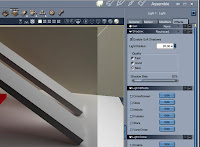
- Enhanced lighting controls such as shadow bias (used to correct self shadowing on low resolution objects) and lighting effects (CrossScreen, Glow, Nebula, Pulsator, Stars, VarioCross) see screenshot below.
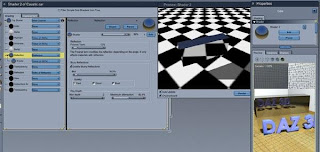
- More transparency options for shaders, In-Scattering; an effect by the light reflected by small particles inside a medium such as cloudy water or a smokey room and a direct Absorption control. See Shark video above for an example of In-Scattering.
- New scene wizards, the empty scene can now be created with different default scales which affects the default size of new objects.

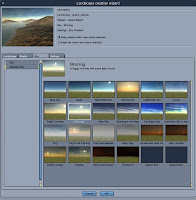
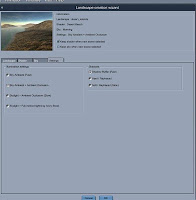
- There is also a new landscape wizard with a wide range of options for land and sky.

http://www.digitalpainters.net/car/v4moutain2b.mov
- Landscapes can be edited to use Render Time Displacement which uses less memory and can generate more details

- An alternative rotation controller to help with, for example character animation
- Enhanced editing of multiple selection for example if many lights are selected then you can change their brightness simultaneously or many object can be hidden at once.
- Unicode Support: Support for unicode object names and choice of fonts in the UI.
- Given that Daz have Collada Import and Export support in Daz Studio there is some speculation that there might be import and export support for Carrara 6. The is already a Collada plugin for C5.
There have been some observations that some of the new functions look like the previous generation of add-ins from
Digital Carvers Guild such as Ground Control and Project Gemini. There are rumours that Erik is updating his current plugins to be compatible.
Microsoft's X format, import/export will be supported in a limited way in the release.
A flyer for C6 has been seen at Siggraph 2007.

Daz3D have announced that "Carrara 6 is scheduled to be released for sale on the DAZ 3D website in August 2007 with a special introductory discount being offered to DAZ 3D customers. The standard edition of Carrara 6 will have a MSRP of $249, and Carrara 6 Pro will have a MSRP of $549."
Daz3D's own
Carrara 6 summary thread (needs registration)
For reference:
Carrara 5 full feature listCarrara 5 Pro vs Standard


